> ## Documentation Index
> Fetch the complete documentation index at: https://ade-ac1c6011-dependabot-github-actions-actions-cache-6.mintlify.site/llms.txt
> Use this file to discover all available pages before exploring further.
# iOS companion
> Pair the ADE iOS app with your Mac over a live WebSocket and mirror lanes, chats, and PRs in real time — start chats, review and merge PRs, all from your phone.
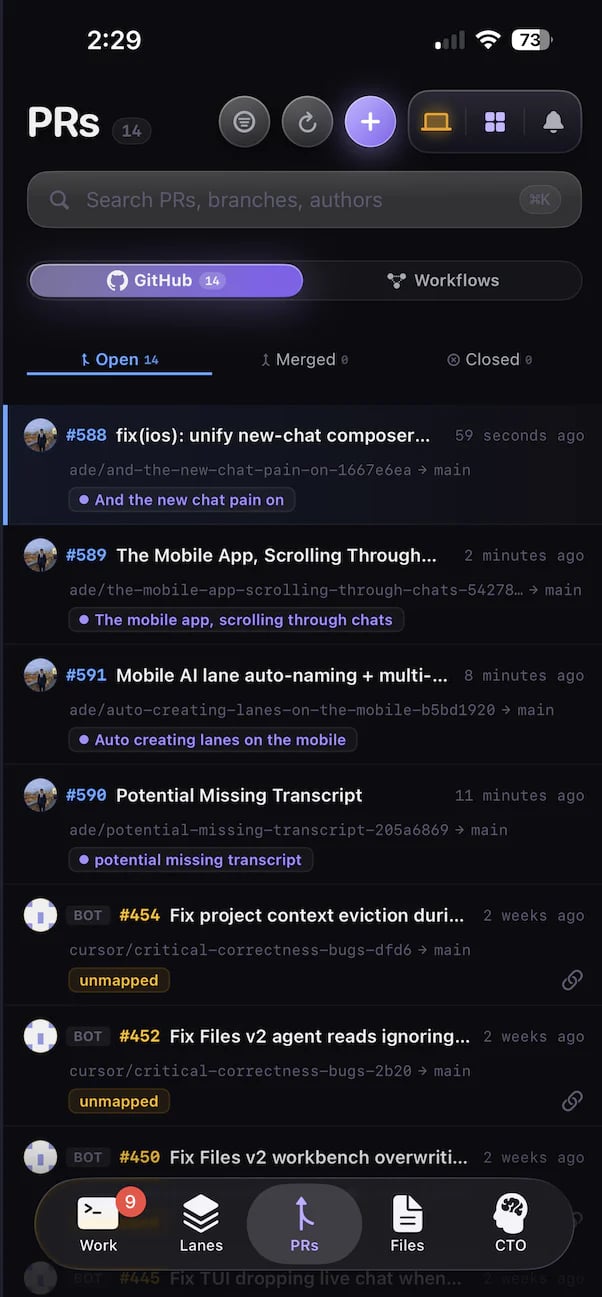
The ADE iOS app is a client for your Mac. It pairs over a live WebSocket and mirrors your lanes, chats, and PRs in real time. Start or continue a chat, review and merge a PR, or browse a lane's diff — from your phone. Your source code never leaves the Mac. The phone is a thin client; the agents run on the desktop runtime.
Install ADE Mobile from TestFlight, then pair it with your Mac.
 ## What mobile is for
See lanes, chats, PRs, and worker activity update live while you are away from the desktop.
Start a new chat or continue an existing one — the agent runs on the Mac, the transcript streams to your phone.
Read the diff, CI status, and comments, then merge when it is green — without opening a laptop.
The same lanes and sessions follow you between desktop, `ade code`, and the phone over one live connection.
## Pair your phone
Pairing links the app to your Mac's runtime with a one-time PIN. Generate the PIN on the desktop (or from the CLI), enter it on the phone, and the app connects.
Open [TestFlight](https://testflight.apple.com/join/ZSdJGKPy) on your iPhone and install ADE Mobile.
Open the desktop **Mobile** control and generate a pairing PIN, or run `ade brain pin generate` from any shell.
Open the ADE app on your iPhone and type the PIN to pair with your machine.
The phone shows your project catalog and current lanes; the desktop lists the device as paired. From here, lanes, chats, and PRs stream live.
The pairing PIN is owned by the machine's ADE brain, so you can manage it without the desktop UI:
```bash theme={null}
ade brain pin generate # generate a one-time phone pairing PIN
ade brain pin set 123456 # set an explicit PIN
ade brain pin clear # invalidate the current PIN
ade brain status --text # endpoint, service, and sync state
```
Run `ade brain --help` to see every flag.
## Review and merge from anywhere
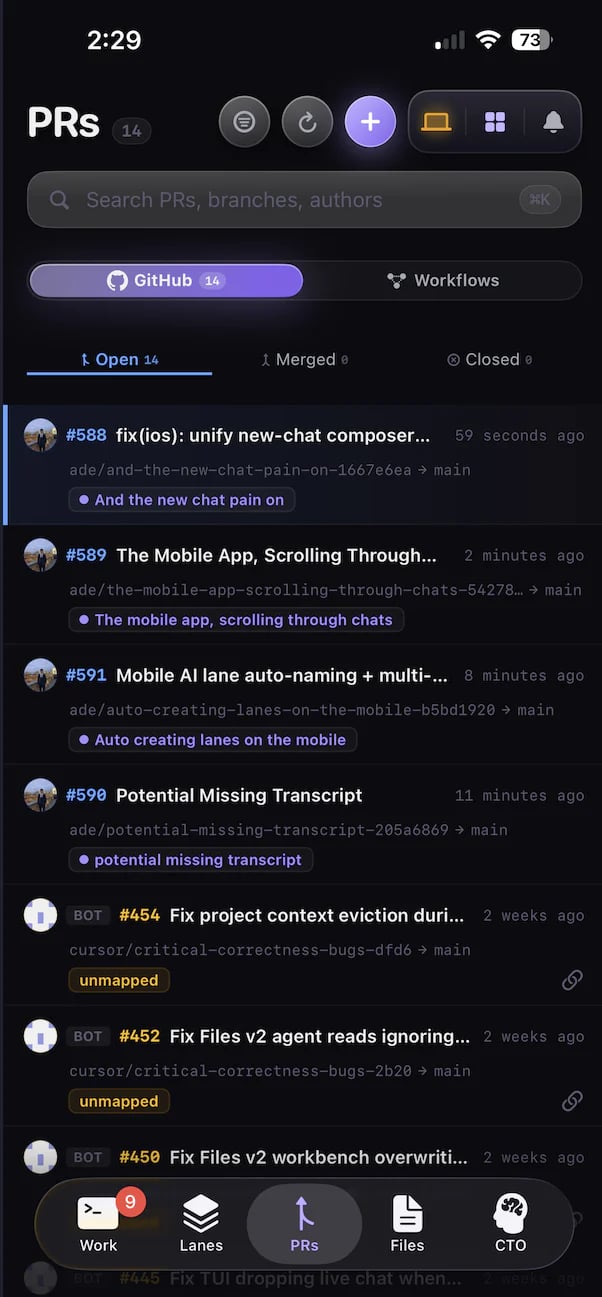
A PR your agents opened shows up on the phone with its diff, CI status, and comments. Read it, leave the work running on the Mac, and merge when it goes green.
## What mobile is for
See lanes, chats, PRs, and worker activity update live while you are away from the desktop.
Start a new chat or continue an existing one — the agent runs on the Mac, the transcript streams to your phone.
Read the diff, CI status, and comments, then merge when it is green — without opening a laptop.
The same lanes and sessions follow you between desktop, `ade code`, and the phone over one live connection.
## Pair your phone
Pairing links the app to your Mac's runtime with a one-time PIN. Generate the PIN on the desktop (or from the CLI), enter it on the phone, and the app connects.
Open [TestFlight](https://testflight.apple.com/join/ZSdJGKPy) on your iPhone and install ADE Mobile.
Open the desktop **Mobile** control and generate a pairing PIN, or run `ade brain pin generate` from any shell.
Open the ADE app on your iPhone and type the PIN to pair with your machine.
The phone shows your project catalog and current lanes; the desktop lists the device as paired. From here, lanes, chats, and PRs stream live.
The pairing PIN is owned by the machine's ADE brain, so you can manage it without the desktop UI:
```bash theme={null}
ade brain pin generate # generate a one-time phone pairing PIN
ade brain pin set 123456 # set an explicit PIN
ade brain pin clear # invalidate the current PIN
ade brain status --text # endpoint, service, and sync state
```
Run `ade brain --help` to see every flag.
## Review and merge from anywhere
A PR your agents opened shows up on the phone with its diff, CI status, and comments. Read it, leave the work running on the Mac, and merge when it goes green.
 ## What to expect
* The Mac must be running — agents execute on the desktop runtime, and the phone mirrors them.
* Connection is a live WebSocket, so lanes, transcripts, and PR state update as they change. No manual refresh.
* Network reachability matters. Local Wi-Fi is simplest; a tailnet makes reconnection easy when you leave the house.
* Large artifacts and diffs load on demand.
* Source and project data stay tied to the paired Mac. The phone holds no checkout.
If the app looks connected but updates do not arrive, check the desktop **Mobile** control first, then confirm both devices can reach each other on the network.
The same lanes and chats in a fast terminal UI.
How PRs are created, reviewed, and merged in ADE.
## What to expect
* The Mac must be running — agents execute on the desktop runtime, and the phone mirrors them.
* Connection is a live WebSocket, so lanes, transcripts, and PR state update as they change. No manual refresh.
* Network reachability matters. Local Wi-Fi is simplest; a tailnet makes reconnection easy when you leave the house.
* Large artifacts and diffs load on demand.
* Source and project data stay tied to the paired Mac. The phone holds no checkout.
If the app looks connected but updates do not arrive, check the desktop **Mobile** control first, then confirm both devices can reach each other on the network.
The same lanes and chats in a fast terminal UI.
How PRs are created, reviewed, and merged in ADE.