> ## Documentation Index
> Fetch the complete documentation index at: https://ade-ac1c6011-dependabot-github-actions-actions-cache-6.mintlify.site/llms.txt
> Use this file to discover all available pages before exploring further.
# Linear
> Connect a Linear workspace to browse and search issues, attach them to lanes and chats, and carry the link through branch names, commits, and PRs.
Connect Linear when your planning and review loop already runs through Linear issues. Once connected, you can browse and search issues from inside ADE, attach an issue to a lane or a chat, and let ADE carry that link through the branch name, commit messages, and the PR — so Linear links the work back to the issue. An optional live-status round-trip reflects an agent's progress back into Linear.
## What the integration does
Open the issue browser from the top bar to search, filter, read comments, and see cycle and sub-issue detail.
Connect a Linear issue to a lane or chat. ADE derives the lane and branch name and attaches the issue as context.
Connected lanes prefix commits with the issue reference and seed the PR title and body so Linear links the work back — and closes the issue on merge if you choose.
When enabled, ADE moves the issue to In Progress on launch, comments the PR link, and marks it Done on merge.
## Connect Linear
Connect from **Settings → Integrations**, or from the CTO's Settings sheet. There are two paths:
The primary path. ADE opens a Linear sign-in and stores the resulting token, refreshing it for you. The sign-in session is short-lived, so finish it promptly.
The alternative — paste a key that doesn't expire. Good for headless or automated setups.
Attach an issue to a lane and confirm it shows up in the lane and in chat context.
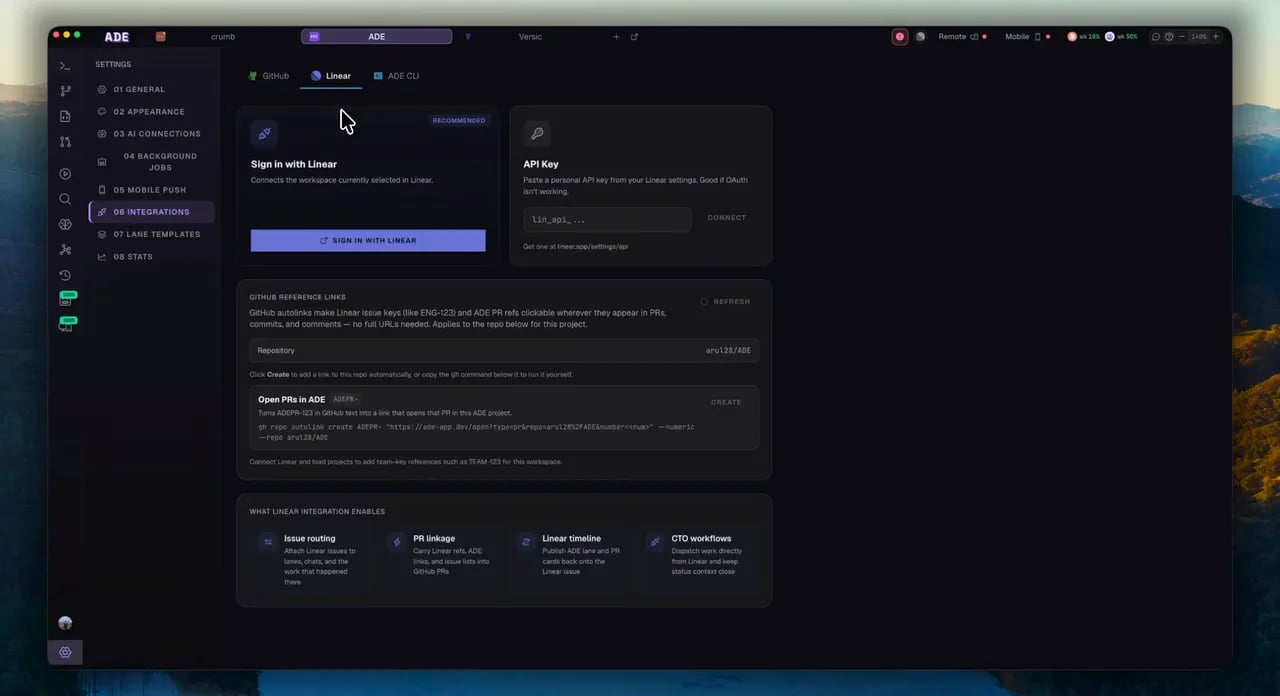 Until a token is stored, the integration stays dormant — nothing polls and nothing binds. Connecting is a deliberate act.
## From issue to PR
The everyday flow starts with an issue and ends with a linked PR.
Create a lane from an issue (or attach one to an existing lane or chat). ADE derives the lane name and branch name from the issue and attaches it as context.
The agent implements in its worktree. Commit messages are auto-prefixed with the issue reference.
The PR title and body are seeded from the issue, with a `Fixes` or `Refs` magic word so Linear links — and optionally closes — the issue on merge.
With the live-status round-trip enabled, ADE moves the issue to In Progress on launch, comments the PR link, and marks it Done on merge.
### Launch several issues at once
From the issue browser you can multi-select issues and launch them together — one lane per issue, optionally with an agent kickoff prompt each. Failures are isolated so one bad issue doesn't stop the rest, and you can retry just the ones that failed.
Linear triggers in [Automations](/tools/automations) are context-only. There is no autonomous issue-routing engine — any Linear write from an automation is an explicit rule action.
## Good CTO prompts with Linear
```text theme={null}
Read ENG-142 and propose a lane plan with acceptance criteria.
```
```text theme={null}
Summarize what changed on the PR linked to ENG-142 and draft a Linear update.
```
```text theme={null}
Which of my Linear issues are ready to start?
```
Pick a personality and work style, then optionally choose a model and connect Linear.
The persistent operator that can browse and update Linear issues from its thread.
Until a token is stored, the integration stays dormant — nothing polls and nothing binds. Connecting is a deliberate act.
## From issue to PR
The everyday flow starts with an issue and ends with a linked PR.
Create a lane from an issue (or attach one to an existing lane or chat). ADE derives the lane name and branch name from the issue and attaches it as context.
The agent implements in its worktree. Commit messages are auto-prefixed with the issue reference.
The PR title and body are seeded from the issue, with a `Fixes` or `Refs` magic word so Linear links — and optionally closes — the issue on merge.
With the live-status round-trip enabled, ADE moves the issue to In Progress on launch, comments the PR link, and marks it Done on merge.
### Launch several issues at once
From the issue browser you can multi-select issues and launch them together — one lane per issue, optionally with an agent kickoff prompt each. Failures are isolated so one bad issue doesn't stop the rest, and you can retry just the ones that failed.
Linear triggers in [Automations](/tools/automations) are context-only. There is no autonomous issue-routing engine — any Linear write from an automation is an explicit rule action.
## Good CTO prompts with Linear
```text theme={null}
Read ENG-142 and propose a lane plan with acceptance criteria.
```
```text theme={null}
Summarize what changed on the PR linked to ENG-142 and draft a Linear update.
```
```text theme={null}
Which of my Linear issues are ready to start?
```
Pick a personality and work style, then optionally choose a model and connect Linear.
The persistent operator that can browse and update Linear issues from its thread.